Acceptance testing without the calls, spreadsheets and guesswork
When a custom app goes to a client's team or to your own operators, feedback arrives as vague emails, Slack messages and spreadsheets. With Tuix, they point at the problem and write one sentence. You get what you need to fix it, and they confirm the fix in the same place.
20 minutes, no sales deck. Rather start on your own? Start a free trial.
Without contextIt doesn’t work.
With Tuix
- Report
- Save changes does nothing on this invoice.
- Reporter
- Ola, accounts team, signed in through your app
- Element
- button[data-testid="save-btn"]
- Environment
- uat · release 2026.09.17-4f2a · Chrome
- Captured
- 1 console error · POST /api/invoices → 500
- Closed by
- Ola, after she checked the fix on uat
The cost is coordination, not the bug
During acceptance testing and the first months after go-live, most of the cost of a report is the work around it. Someone calls to find out which order, which button and which browser. A screenshot arrives without a page address. A spreadsheet comes back a week later with the same problem in different words. A project manager turns messages into tickets, and the client waits.
Tuix removes that step. The people who use the app report problems where they see them, and each report arrives with the context your developers would otherwise ask for.
From one sentence to a confirmed fix
- Your client's staff or your own operators open Tuix in the app and point at the problem.
- They write one sentence. They need no training and no new account: their identity comes from your app.
- Your team gets the element, a screenshot, the page, browser and release, and console errors and failed requests when capture is on.
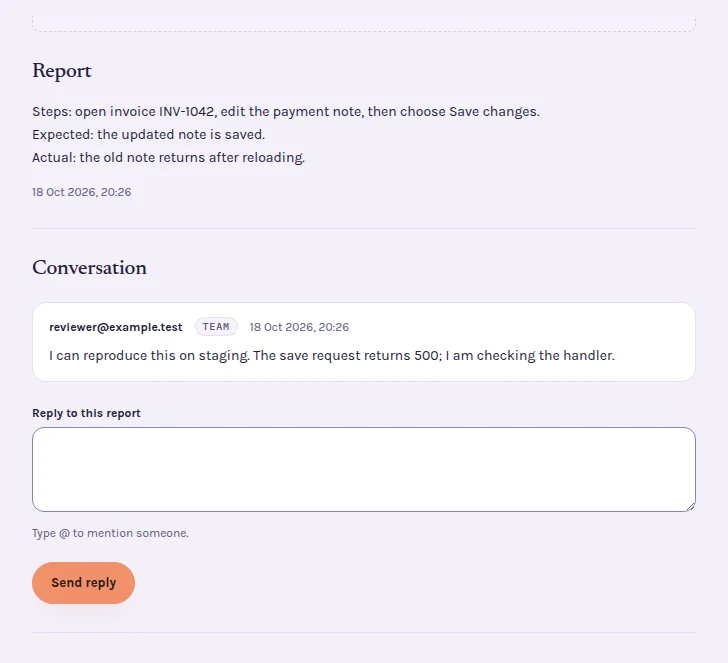
- If something is unclear, you reply in the report. The reporter sees the reply on the page.
- When the fix ships, the reporter checks it on the same spot and confirms it, or says what is still wrong.
What a real rollout looked like
At Cottonbee, staff tested a new in-house production system on its UAT environment with Tuix. In the first 24 days they filed 100 reports, 74 of them from one production operator. 83 went back to the person who reported them, to check the fix on the page.
Client staff never take a seat
Reporters do not take paid team seats, so you can invite the whole client team, not just one contact. Your developers and project managers use the dashboard; plans differ in team seats and active projects. See pricing.
Answers for your client's IT
Every service that stores or processes customer data is run by a European company, in the EU. You can run Tuix on the acceptance environment only, for signed-in staff. Send your client's IT the data processing agreement and the subprocessors. When you build for a client, Tuix processes that client's data, so name it in your agreement with them before the first install.
For the evidence each report carries, see visual bug reporting. If you build websites rather than business apps, see client website reviews.
Rolling out an app to a client or your own staff?
Book 20 minutes. We install Tuix together on your acceptance environment, and your reporters can start the same day.