Collect client feedback directly on their website
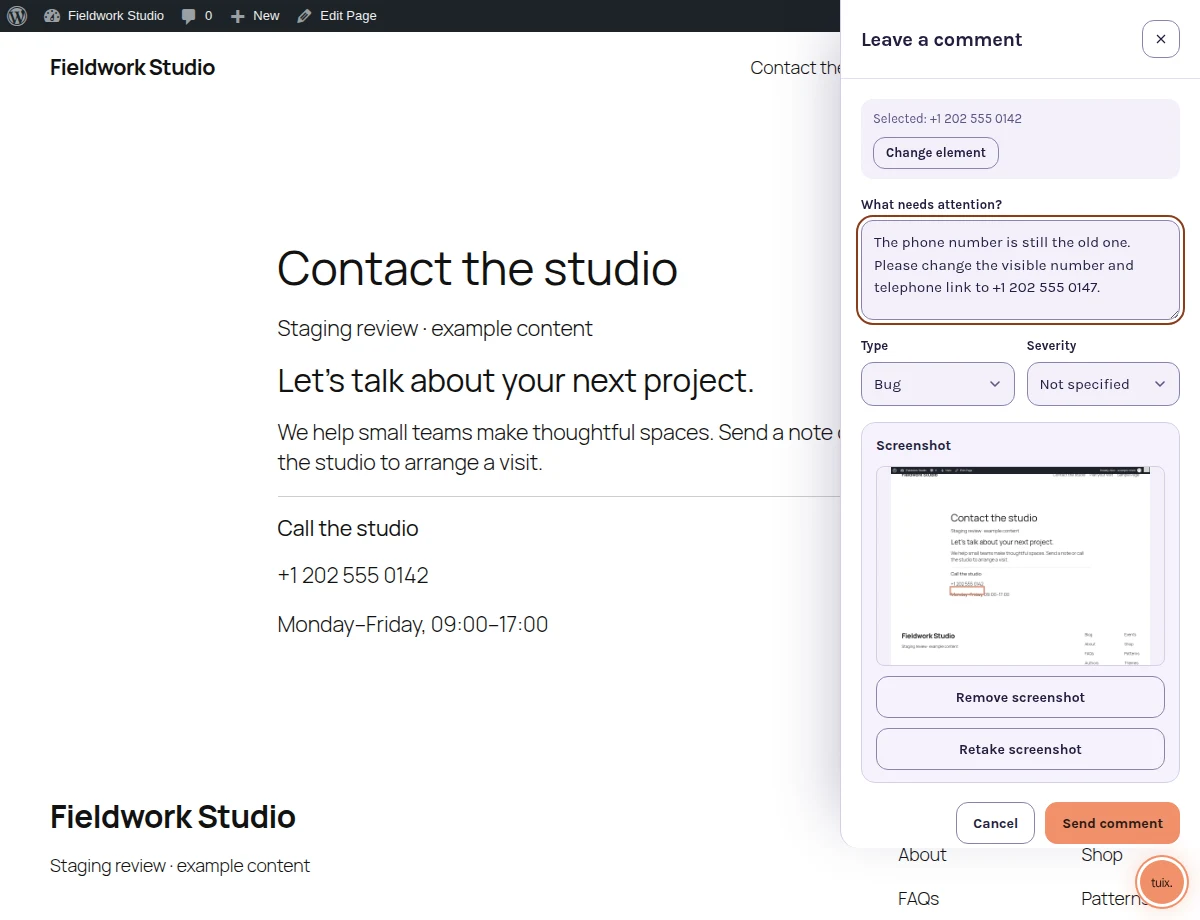
Give clients a place to point at what needs changing. Your team receives the page and element with the note, and the client checks the revision in the same place.
14-day trial on a paid web plan. No card required.
- Client note
- The phone number on the contact page is still the old one.
- Page
- staging.example.test/contact-the-studio/
- Element
- Contact-page telephone link
- Developer reply
- Updated the visible number and the link. Ready to check.
- Client check
- The number is correct and tapping it opens the right number.
One review location for each revision
Email threads split the screenshot from the request. A client may annotate one version of a page while a developer opens another. A note attached to the website keeps the affected element and the discussion together, so “change this” has a visible reference.
Tuix is a website feedback tool for agencies that want a clear handoff between client review and implementation. It does not replace your project schedule or decide which requests are in scope.
A staging review from invitation to confirmation
- Create a project for the client website and allow its staging origin.
- Install Tuix and configure the host application's reporter identity. For WordPress, choose eligible signed-in roles in the plugin.
- Share the staging URL and the access instructions with the client.
- The client selects an element, writes the request and reviews the attachments.
- The developer investigates, replies and implements the agreed revision.
- After the change is available, ask the client to check the original element and confirm the result.
Clients do not need a separate Tuix signup to leave notes through the integration. They do need the access and identity your site provides. A staging password alone does not configure Tuix identity.
Separate client projects, shared team workflow
Use one project per client site to keep its reports, allowed origins and settings together. Project permissions determine who can see and manage reports. Paid plans have different limits for active projects and team members; client reviewers do not consume paid team seats. The free developer plan is for local development and does not support client review on hosted staging sites.
The pricing comparison reads the same plan definitions as billing. Choose a plan based on your active client projects, team size, history needs and whether you need Slack updates.
Review the behavior as well as the pixels
In the contact-page example, changing the visible number is only half the job. The client should also tap the telephone link. Keep those acceptance criteria in the note so the final check tests the requested outcome.
For WordPress projects, follow the plugin installation and access guide. For defects that need browser and error context, see visual bug reporting.
For a practical review brief and acceptance checklist, read how to collect website feedback from clients.
Stop chasing client feedback across emails and screenshots.
Let clients point at what needs attention on their staging website. Keep the revision, conversation and final check in one report.