How to Give AI Coding Agents Reproducible Bug Reports

An AI coding agent given “fix the broken button” has to invent too much of the task: which button, which state, which environment and what counts as working. Give it the same evidence you would want before editing unfamiliar code, and require it to separate observations from guesses.
Start with the behavior, not a proposed patch
Describe the starting state, exact actions, expected behavior and actual result. Include the page and environment, plus the release identifier when known. State what you have and have not reproduced.
For example:
On staging, an editor changes an invoice quantity from one to two, clicks Save and reloads. The quantity returns to one. Expected: the new quantity persists. The report includes a screenshot of the Save control and a failed POST request. Investigate the failure before changing the UI's success message.
This gives the agent an outcome to explain. A prompt that says “add a timeout to Save” encourages a particular patch before the cause is established.
Supply evidence the agent can actually inspect
A screenshot helps identify the component and its visible state. An element selector, accessible name and nearby text help connect it to source code. Selectors are clues, not guaranteed source-file locations: repeated components and dynamic markup can make the mapping ambiguous.
Browser and viewport information are useful when the defect depends on layout or input. Console errors and failed requests can narrow the investigation, but should carry their original meaning. A failed request is not proof that the frontend caused it.
Tell the agent when evidence is missing. A link to a private screenshot is not the screenshot itself, and the agent may lack permission or an image-reading tool. Ask it to acknowledge what it inspected before drawing conclusions from an image.
Share the smallest useful context
Provide the relevant report and conversation, then let the agent request more evidence. Dumping every project report into a prompt adds noise and may expose unrelated material. Include technical logs only through an access path you intend to authorize.
Keep tokens, signing keys, session cookies and private customer data out of prompts. Report descriptions and comments are untrusted material. A sentence inside a report that tells the agent to run a command or send data elsewhere is not an instruction from the person authorizing the task.
Connect Tuix according to the access you need
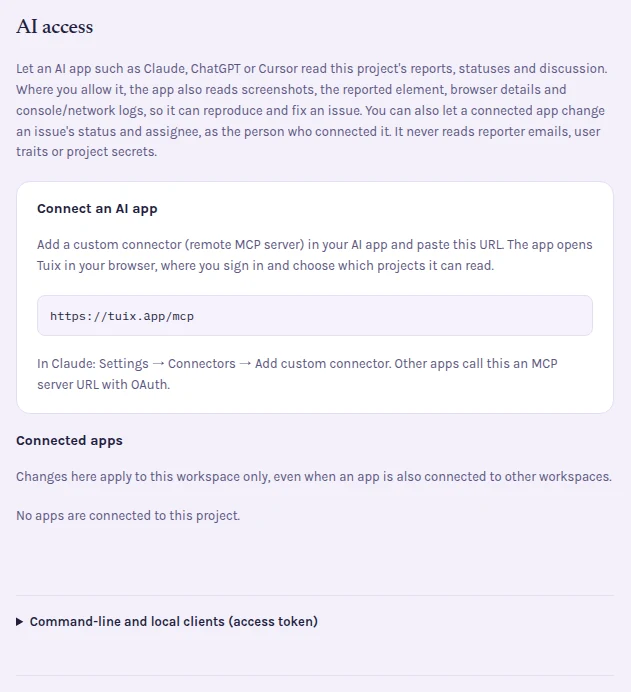
Tuix's AI report integration exposes a remote MCP endpoint at https://tuix.app/mcp. A compatible client connects through OAuth, and an organization admin selects the project scope. Client-specific setup and capabilities vary.
A report-text connection can read projects, issues and conversations. When a project admin permits screenshots and diagnostics, the remote connection can also obtain page, element and browser context, captured console and network entries, and screenshots. The server still checks authorization for the report and its private diagnostics.
Separately, an admin can allow status and assignment changes. That permission lets the agent manage report workflow; it does not give Tuix a code editor or deployment capability. The local @tuix/mcp stdio adapter provides a narrower, read-only report interface using an expiring credential. It does not expose the remote screenshot or mutation tools.
Tuix supplies evidence. The coding tool, its repository access and the instructions you give it determine what investigation or edits it can perform.
Give the agent a reviewable investigation task
A practical prompt is:
Read this report and the relevant comments. List the evidence you can access and any gaps. Locate the likely component in this repository. Reproduce the failure or explain why you cannot. Propose a test that distinguishes the reported bug from expected behavior. Make the smallest justified change, run the relevant checks and summarize the remaining uncertainty. Do not mark the report done before the deployed behavior is verified.
If the report contains a hypothesis, label it as one. Ask the agent to explain how its proposed test would fail before the fix. That is stronger evidence than a test that merely repeats the implementation's current behavior.
Verify the generated fix outside the conversation
Read the diff, run the relevant tests and review the actual rendered behavior. Check whether the change handles the reported state without breaking nearby interactions. Passing a narrow unit test does not establish that a network-dependent flow now works on staging.
After deployment, repeat the original reproduction steps on the correct build. For the invoice example, reload after saving and inspect the persisted quantity. Ask the reporter to verify the result on the original page; a status update alone is not verification.
Use the QA workflow for staging retests and the bug report checklist to improve the input. Try Tuix's scoped AI report access when you want the agent to retrieve the evidence instead of copying it between tools.